

You have probably heard this before: users are Impatient. But here is the part that actually stings: most websites are still built as if loading speed doesn’t matter. It does. More than you think. Every extra second of load time costs you visitors, sales, and trust. And in 2026, that cost has gone up.
Progressive Web Apps, or PWAs, sit right at the intersection of speed, experience, and reach. They look and feel like native apps, but they live on the web. No app store. No separate Android build. No separate iOS build. Just one thing that works, fast, everywhere.
Whether you are working with a web app development company in Mohali or figuring this out yourself, this guide gives you everything you need to understand PWAs, build one correctly, and know what kind of results to realistically expect.
What Is a Progressive Web App
A Progressive Web App is a web application built with standard web technologies, HTML, CSS, and JavaScript, that behaves like a native mobile app. It loads fast even on a slow connection, works offline, can sit on your home screen, and sends push notifications. No download required. No app store involved.
The term itself was coined back in 2015 by Google engineer Alex Russell and designer Frances Berriman. They noticed a new kind of web experience emerging, one that felt more like software than a webpage. Since then, the technology has grown considerably. And in 2025, full browser support finally arrived, including Safari, which had been the last real holdout. That was the moment the last major excuse to avoid PWAs disappeared.
A PWA has to check three boxes to genuinely earn the name:
- Reliable: It loads right away, even when the network is patchy. Service worker caching makes this possible.
- Fast: Interactions feel smooth. No jank, no lag, no frustrated tapping.
- Engaging: It can be installed on a home screen and send push notifications, just like a native app.
These are not soft guidelines either. Tools like Google Lighthouse audit for them directly. When your app passes, users feel it immediately. When it does not, they leave.
The PWA Market in 2026, And Why the Window Is Still Open
One thing worth understanding before you build anything: PWAs are not a trend that peaked somewhere in 2022. The market is still growing fast, and the businesses investing now are the ones who will be hardest to catch later.
Where the Market Stands Today
The global PWA market was valued at over USD 2.47 billion in 2025, and it is projected to grow at a CAGR of 30.2%, reaching USD 34.58 billion by 2035. The market size for 2026 alone is estimated at USD 3.14 billion. Grand View Research puts the 2033 figure at USD 21.24 billion, growing at a CAGR of 29.9%. The exact numbers vary by source, but the direction is unanimous: sustained, high-double-digit growth across the decade.
North America led in 2024 with a 32.9% revenue share, pushed by companies like Microsoft and Google embedding PWA tooling into their core developer ecosystems. But Asia Pacific is actually set to grow fastest between 2025 and 2034, driven by smartphone penetration, improving connectivity, and rising disposable income. India falls squarely in that growth story.
What Is Actually Pushing Adoption
It is not just hype. Four concrete shifts are accelerating PWA adoption right now:
Browser support is finally universal
Safari was the last holdout. That changed. PWAs now work reliably everywhere, including on iPhones.
Mobile-first is now just the baseline
With over 4.88 billion smartphone owners globally, users expect app-quality experiences from the web. A mobile website that feels sluggish is a liability.
Native app costs are hard to justify
Maintaining separate iOS and Android codebases is expensive and slow. PWAs replace both with one.
Device integration has deepened
PWAs can now access biometric authentication and Bluetooth through supported browsers, capabilities that had previously only been available to native apps.
For businesses searching for web app development services in Chandigarh, it’s worth remembering that these changes are not mere theories. They are breaking down what users should expect when they land on your product. And once raised, expectations don’t lower.
The Core Technical Components, Explained Simply
You do not need to be a developer to understand what makes a PWA work. But you do need to know enough to ask the right questions, whether you are hiring a team, briefing a web design company in Chandigarh, or reviewing a build. Here is what is actually under the hood.
| Component | What It Does | Why It Matters |
|---|---|---|
| Service Worker | Runs in the background, intercepts network requests, manages caching, and sends push notifications. | The engine behind offline access and fast repeat visits. |
| Web App Manifest | A JSON file that controls how the app looks and behaves when installed. | Sets home screen icon, splash screen, display mode, and theme colors. |
| HTTPS | Mandatory secure connection: service workers will not register without it. | Protects data in transit; no HTTPS means no PWA. |
| Responsive Design | Fluid layouts that adapt to any screen size or orientation. | Consistent experience across mobile, tablet, and desktop. |
| App Shell Architecture | Separates the UI shell from dynamic content so the shell loads first. | Near-instant perceived load time on repeat visits. |
| Cache API | Stores assets locally on the device using defined caching strategies. | Powers offline functionality and dramatically cuts load times. |
These six components only work well when they are wired together properly. A service worker without a smart caching strategy does not deliver offline capability in any meaningful way. A manifest file sitting on a site that is not responsive produces a poor installed experience. The quality of a PWA comes down to integration, not just installation. That is why the choice of who builds it matters a lot.
How to Build a PWA in 2026, Step by Step
Building a PWA is not dramatically different from building a good modern website. But the sequencing matters. Skip steps, and you end up with something that passes a basic Lighthouse audit but falls apart in real usage. Here is the right order.
Start With an Honest Audit
Before writing a line of code, run Google Lighthouse on your existing site. It gives you a PWA readiness score and flags exactly where the gaps are. The things to focus on: current page load time (anything over two seconds is a problem), mobile responsiveness, HTTPS status, and whether any caching is already in place. This audit tells you whether you are converting an existing site or starting fresh, and both are valid paths.
Set Up Your Web App Manifest
The manifest.json is a small file that does a big job. It tells the browser how to present your PWA when someone installs it. You need at minimum a name and short_name, icon assets at 192px and 512px, a start_url, and the display mode set to standalone, which is what gives it the full-screen, app-like feel. Get this wrong, and users get a confusing, half-built experience on installation.
Implement the Service Worker
This is where most developers either get it right or create problems that only show up later. The service worker handles caching, offline fallback pages, background sync, and push notification subscriptions. There are three caching strategies worth knowing:
- Cache-first: Serves from cache immediately. Best for static assets like fonts, icons, and images.
- Network-first: Try the network, then fall back to cache. Great for content that is updated regularly.
- Stale-while-revalidate: Immediately sends cached content and updates in the background. Great for blog content or news feeds.
Choosing the wrong strategy for a given asset type is one of the most common PWA mistakes. Static assets should almost never go through a network-first strategy. Dynamic content should almost never be cache-first.
Pick the Right Framework
In 2026, you have good options across the board:
- Next.js with the next-pwa plugin is most popular in React projects and has a strong community.
- Nuxt.js handles PWA configuration cleanly for Vue-based applications with a dedicated module.
- Angular includes @angular/service-worker natively, which is solid for enterprise-scale builds.
- Workbox from Google works with any framework and gives you fine-grained control over service worker behavior.
Test on Real Devices, Not Just DevTools
This step gets skipped more than any other. Testing in Chrome DevTools with throttled network conditions is useful, but it is not the same as testing on a real mid-range Android phone on a real 3G connection. Your PWA might perform beautifully in a simulator and frustrate half your actual users. Test on real hardware. Test offline explicitly. Run Lighthouse again after implementation and resolve everything flagged before going live.
If you are migrating an existing CMS-based site, 42Works has published a practical walkthrough for converting WordPress sites to PWAs, as well as a breakdown of PWA development costs and tooling that is worth reading before you start scoping the work.
What PWAs Actually Deliver: Real Results From Real Businesses
At some point, every technical conversation needs to get practical. So here is the honest answer to the question that actually matters: Do PWAs move the needle for businesses? Yes. And not by a small margin.
The Numbers From the Field
These results come from documented case studies tracked by PWAStats and MobiLoud:
- Alibaba saw a 76% increase in mobile web conversions. Active users grew 14% on iOS and 30% on Android after launching its PWA.
- Twitter Lite was built specifically for users in low-bandwidth regions. Bounce rates dropped 20%, and tweets sent went up 75%.
- Pinterest gained a 40% boost in total time spent on site and 44% growth in user-generated ad revenue.
- Kaporal recorded 60% fewer bounces, 15% more desktop conversions, and 8% more mobile conversions after deploying a new PWA experience.
- Butcher of Blue grew mobile users by 154%, monthly active users by 154%, and conversions by 169%. Pages loaded 85% faster.
- Kubota saw 192% growth in daily visitors and 26% growth in average monthly visits after launching its e-commerce PWA.
These are not outlier results from companies with unlimited budgets. Twitter Lite was built for users with old phones and slow data. Kaporal is a fashion brand. Kubota sells tractors. PWAs improve the fundamentals, speed, reliability, accessibility, and the business metrics follow.
The Operational Case
Beyond conversions, there is a quieter but equally important argument for PWAs: operational efficiency. One codebase replaces three. No app store approval delays. Updates go live the moment you deploy them, not two weeks later. And compared to traditional web apps, PWAs show a 70% increase in session length and a 20% increase in page views per session. That is not just a performance win; it is a direct reduction in the cost per engaged user.
For businesses evaluating web app development services in Chandigarh with a mind on long-term returns, operational simplicity compounds over time in ways a native app budget simply cannot match.
PWA vs Native App vs Traditional Website

The honest version of this comparison is not that PWAs win on every dimension. They do not. But for most business use cases, they win on the dimensions that matter most. Here is how they stack up:
Performance in Low-Connectivity Environments
PWAs cache aggressively and serve content from local storage. On a 2G or 3G connection or in an area with a spotty signal, that is the difference between a usable product and a loading spinner. Native apps still make server calls for dynamic content, which means they are not automatically better in poor connectivity. For markets like India, this is a genuinely meaningful distinction.
Discoverability and SEO
Native apps live in app stores. Users have to go looking for them. PWAs live on the web and are fully indexed by search engines. Your SEO work carries over completely; every blog post, every product page, every backlink still counts. For any website designing firm in Mohali advising clients on long-term organic visibility, this matters enormously.
Development and Ongoing Maintenance
A single PWA codebase replaces three separate development tracks: web, iOS, and Android. Every feature, bug fix, and design update happens once. That cost advantage does not just apply at launch. It compounds every quarter as your product evolves.
Access to Native Hardware Features
This is where native apps still hold the edge. If your product requires continuous background GPS tracking, heavy augmented reality, or complex Bluetooth peripheral management, native is the better fit. For the vast majority of business applications, though, PWA capabilities are sufficient. And that gap keeps narrowing.
PWAs and SEO, Getting It Right
A common worry when people first consider PWAs is whether they hurt SEO. The short answer is no, if they are built correctly. The longer answer is that a well-built PWA actually improves your search performance because performance and rankings are more connected than most people realize.
A few things to get right from the start:
- PWAs are fully crawlable by Googlebot. They are standard web applications served over HTTPS, not black boxes.
- Use server-side rendering via Next.js or Nuxt.js. Client-side-only rendering leaves dynamic content invisible to crawlers in some scenarios.
- Faster load times improve Core Web Vitals scores, LCP, INP, and CLS, all of which Google uses as ranking signals directly.
- Push notifications bring users back. Return visits improve engagement signals, which factor into long-term ranking authority.
- Both Google Lighthouse and Microsoft PWABuilder are free tools that flag SEO-relevant PWA issues before you go live.
Speed and visibility work in a loop. A faster site earns better rankings, which brings more traffic, which improves engagement signals further. For businesses investing in web app development services in Mohali, with long-term search growth in mind, PWA performance is not a secondary concern. It is foundational.
Common PWA Mistakes Worth Knowing About
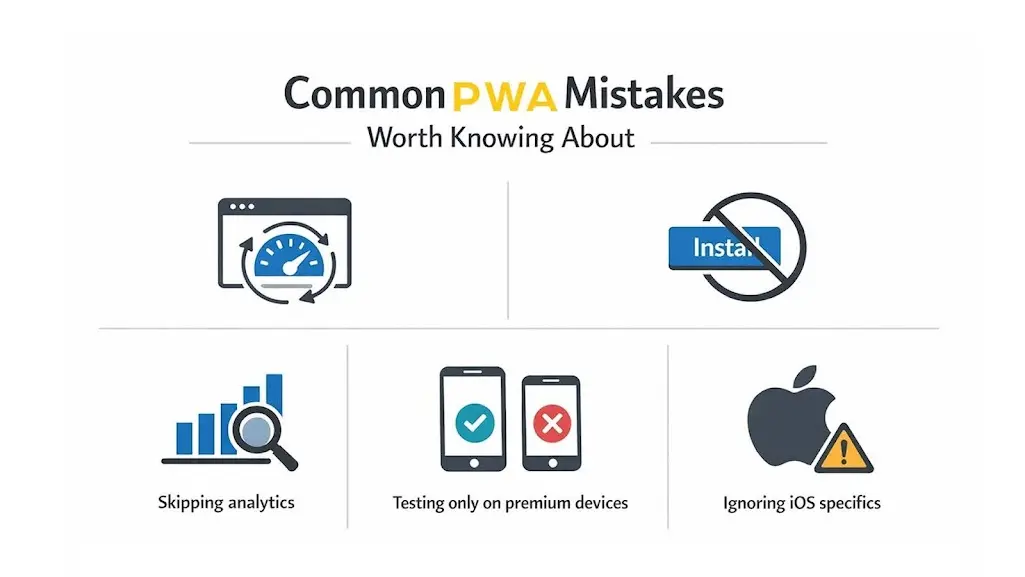
Most underperforming PWAs do not fail because the technology is inadequate. They fail because implementation shortcuts pile up quietly until they become real problems. These are the ones that come up most often.
Over-aggressive caching
Caching without versioned cache keys means users get stale content after updates. Build a clear cache invalidation strategy from the start, not as an afterthought.
Suppressing the install prompt
The browser’s native install prompt is a free conversion opportunity. Do not hide it with custom timing logic unless you have data that justifies a different approach.
Skipping analytics
A PWA is a product. Track install rates, offline usage, notification opt-in rates, and session depth. Without this data, you are flying blind.
Testing only on premium devices
Your PWA may feel perfect on a flagship phone. Test it on a mid-range Android with throttled 3G. That is closer to the actual experience of a large portion of your users.
Ignoring iOS specifics
Even with improved Safari support, iOS has nuances around service worker caching scope and push notification permissions. Test on real iPhone hardware, not just Chrome DevTools.
Which Businesses Should Be Building PWAs Right Now
Honestly? Most of them. But if you want to prioritize, the businesses that benefit most share a common thread: their users visit frequently, mostly on mobile, and in conditions where connectivity is not guaranteed.
- E-commerce brands with high mobile bounce rates or low add-to-cart conversion from mobile sessions. Speed and offline browsing change both numbers.
- Media and content platforms where offline reading adds real value to returning users. If your content is good, people want access to it on the train.
- Healthcare and fintech startups that need secure, fast, cross-platform delivery without the overhead of native app compliance cycles.
- Education platforms serving students in areas where connectivity is inconsistent. Offline content access stops being a nice-to-have and becomes a product requirement.
- SMBs that need mobile-first experiences but cannot justify the cost of separate iOS and Android builds. A PWA gives them both, at a fraction of the investment.
Industries built around frequent interaction and broad reach, such as fintech, education, healthcare, and retail, stand to gain the most from the structural advantages PWAs offer. If you are already exploring web development services in Chandigarh to modernize your digital presence, PWA feasibility belongs in that conversation early.
Conclusion
PWAs are not a trend on its way up. They are a standard on its way in. By 2026, asking whether to build one is starting to feel like asking whether your website should work on mobile. The answer was always yes. The timing is just becoming impossible to ignore.
The web’s original strength was accessibility, reaching anyone, on any device, without friction. PWAs take that and pair it with the speed and experience people have come to expect from apps. That combination works for users, for business results, and for development teams who cannot afford to maintain three separate codebases indefinitely.
Whether you partner with one of the best website designing companies in Chandigarh, like 42Works, or build in-house, the technical foundation is mature, the case is proven, and the market is moving in one direction. The only thing left to decide is when you start, and when you make that decision, 42Works’ team is here to take the load off your shoulders.
Further Reading and Referenced Sources
Each of the following resources was referenced in this guide and goes deeper on specific topics:
- PWAStats, Community-Driven Case Studies
- Grand View Research, PWA Market Report
- 42Works, Website Development Trends in 2026
- 42Works, PWA Development: Costs and Tools
- 42Works, Converting WordPress Sites to PWAs
FAQs
What actually separates a PWA from a regular website?
The core difference is capability. A regular website is just HTML, CSS, and JavaScript served from a server. A PWA adds service workers for offline access and push notifications, a web app manifest for home screen installation, and requires HTTPS. Same underlying language, fundamentally different experience.
Do PWAs work properly on iPhones and Safari now?
Yes, and far more reliably than a couple of years ago. Safari added service worker support, push notifications, and installation prompts in recent versions. There are still some iOS quirks worth testing for explicitly, particularly around notification permissions, but the major blockers are gone.
Can a PWA genuinely replace a native mobile app?
For most business applications, yes. If your product does not require continuous background GPS, heavy AR, or complex hardware peripheral access, a PWA can match the experience at significantly lower cost and maintenance overhead. The gap between PWA and native capabilities keeps narrowing.
How long does building a PWA actually take?
Converting an existing site usually takes four to eight weeks, depending on how much refactoring is needed. A production-ready PWA is normally a 3-6 month engagement from start to finish for a feature-complete application.
Which framework should I use for PWA development in 2026?
If you are working with React, Next.js with next-pwa is the most practical choice. Vue developers typically go with Nuxt.js. Angular has built-in service worker support that handles enterprise-scale needs well. Google’s Workbox library works across all frameworks for fine-grained service worker management.
Will a PWA hurt my SEO?
No, if it is built correctly. PWAs are fully crawlable by search engines. Better yet, the performance improvements they bring directly improve Core Web Vitals scores, which Google uses as ranking signals. Use server-side rendering to make sure dynamic content gets indexed properly, and you are fine.
What does PWA development cost?
A basic conversion of an existing site typically falls between $5,000 and $20,000. A full ground-up build for a complex, feature-rich application is usually $30,000 to $100,000 or more, depending on scope, integrations, and where the team is based.
Can a PWA be listed in the Google Play Store or App Store?
Yes, on Google Play Store, by using Trusted Web Activity (TWA) packaging or similar tools like Microsoft’s PWABuilder. Distribution for PWAs on the Apple App Store is more restricted, but is slowly getting better as Safari’s PWA features mature.
How do push notifications work in a PWA?
Through the Web Push API. Notifications work on Android and desktop. iOS support arrived with recent Safari updates and is now functional for installed PWAs. Users have to opt in explicitly, the same as with native apps.
What exactly is a service worker, and why does everyone keep mentioning it?
A service worker is a JS file that runs in the background and is independent of the page opened, providing capabilities like push notifications. It leverages all the network requests, controls cache behavior, gives offline support, and manages background sync and push notification subscriptions. It is what causes a PWA to feel like an app instead of a webpage. Remove it, and you just have a responsive website.
Are PWAs secure enough for banking or healthcare apps?
PWAs require HTTPS by definition, so data in transit is encrypted. Combined with modern browser security models and APIs like the Origin Private File System, they are increasingly used in fintech and healthcare. That said, regulated industries have additional compliance requirements; those need to be evaluated on their own terms.
What is the difference between a PWA and a Single Page Application (SPA)?
A Single Page Application is an architectural pattern where one HTML document updates dynamically as users navigate. A PWA is a set of capabilities, including offline access, installability, and push notifications, that can sit on top of any architecture, including an SPA. They solve different problems and work well together.
What tools do I use to test whether my PWA is working properly?
Google Lighthouse, built into Chrome DevTools, is the starting point for any PWA audit. The Application tab in DevTools lets you inspect service workers, manifests, and cache storage directly. Beyond tooling, test on real physical devices across different network conditions. DevTools throttling is useful but not a substitute.
Do users have to manually update a PWA when a new version is released?
No. Service workers handle updates in the background. When a new version is deployed, the service worker downloads updated assets during idle time and activates them on the next page load. Users typically experience updates without noticing them at all.
How do I get in touch with 42Works about a PWA project?
Straightforward, you can email the team at contact@42works.net or call +91-9517770042. With 500+ projects delivered across web design, development, and digital strategy, 42Works can assess your current setup and tell you honestly whether a PWA conversion or a ground-up build is the right call for your goals.